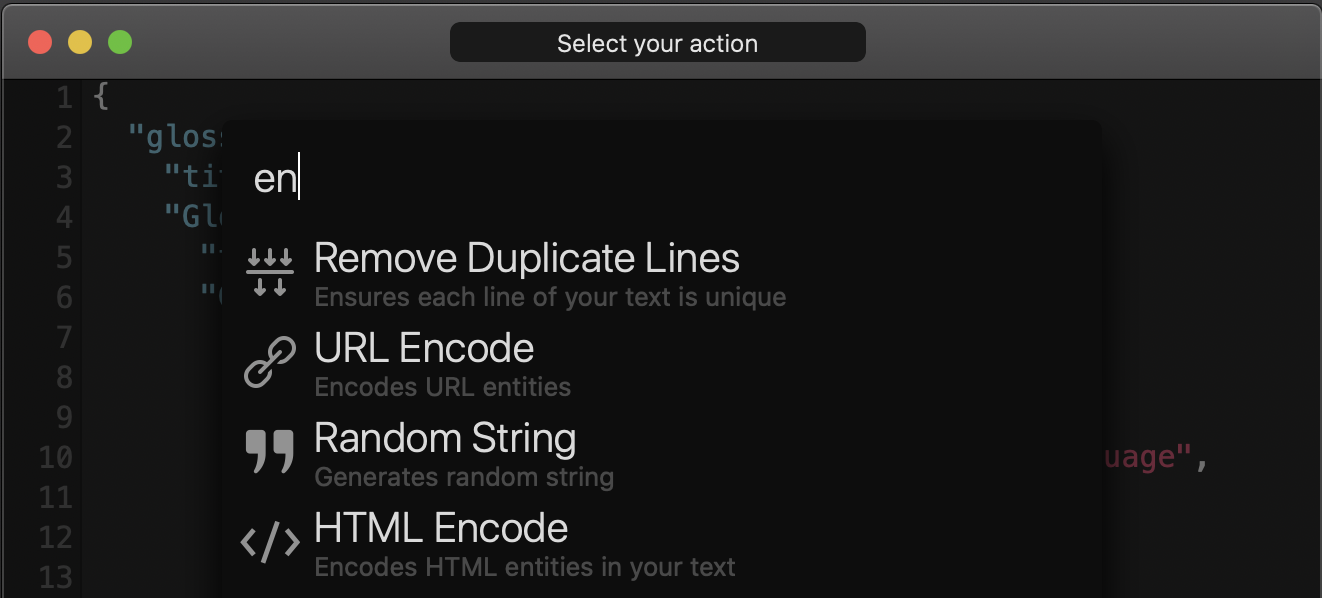
I want to write about a small app I found while browsing GitHub and then started using daily for text processing tasks.
Note: this app is macOS-only.
What is Boop?
Boop is a simple but surprisingly capable text utility you can keep close at hand for everyday operations such as formatting JSON, encoding or decoding Base64, and similar transformations. It is not a code editor.
What can you do with it?
The version I used included actions like these:
AddSlashes
Base64Decode
Base64Encode
CSVtoJSON
CountCharacters
CountLines
DateToTimestamp
DateToUTC
Downcase
FormatJSON
FormatXML
HTMLDecode
HTMLEncode
JSONtoCSV
JWTDecode
JsonToQuery
MD5
MarkdownQuote
QueryToJson
RemoveDuplicates
RemoveSlashes
ReverseLines
ReverseString
ShuffleLines
URLDecode
URLEncode
Upcase
You can also add custom scripts. That is the feature that made Boop genuinely useful for me. Custom scripts are written in JavaScript.
Why use another tool?
Before Boop, I used the Red language for these kinds of quick text jobs by running small scripts in the REPL.
For example, this was a helper script I used to count duplicate lines:
frequency: function [
    "Returns the count of duplicated values in a block"
    data [block!]
][
    result: copy #()

    foreach value data [
        result/:value: either result/:value [result/:value + 1][1]
    ]

    result
]
Usage looked like this:
frequency [12 22 22 "hello" "world"]
; 12 1
; 22 2
; "hello" 1
; "world" 1
That workflow stopped being convenient once the 32-bit Red build no longer fit newer macOS releases. I kept it going with Docker for a while, but it felt too slow for small text operations.
For some time I also tried Ruby by loading a personal helper file into the REPL.
These were three methods I used most often:
def read_clipboard
  `pbpaste`.strip
end

def write_clipboard(arg)
  IO.popen("pbcopy", "w") { |io| io.puts arg }
end

def parse_clipboard
  read_clipboard.split("\n").reject(&:empty?)
end
It is also true that I usually try to solve these small jobs with Python whenever I can.
This was one of my quick scripts for generating a random string and copying it to the clipboard:
import random
import string

import pyperclip as clip


def random_generator(size=6):
    allowed_chars = string.ascii_letters + string.digits + "!#*-+"
    return "".join(random.choice(allowed_chars) for _ in range(size))


def ask_input():
    size = input("Length (10): ").strip()
    if size == "":
        return 10

    try:
        return int(size)
    except ValueError:
        return 10


size = ask_input()
password = random_generator(size)
clip.copy(password)
print(password)
Boop turned out to be a much better fit for this category of task because it opens instantly and keeps common transformations one shortcut away.
How does it work?
After opening Boop, you get a plain text area. Paste or type your text, then press Cmd+B or open Scripts > Open Picker. Once you choose an action, Boop runs the script and replaces the text with the result.
Why use it?
Boop’s slogan explains the main advantage well: stop pasting company secrets into random websites.
If you need to format JSON, decode a JWT, or inspect Base64 data, the usual habit is to search for a random online tool and paste sensitive data into it. Boop lets you do those operations locally instead.
How do custom scripts work?
First, define the script metadata at the top of the file inside a comment block:
/**
 * {
 *   "api": 1,
 *   "name": "My New Script",
 *   "description": "A small example script for this post",
 *   "author": "Semih",
 *   "icon": "collapse",
 *   "tags": "script,test"
 * }
 */
Then add a main function. Boop passes a single state object into that function, and you use it to read or modify the text on screen.
The state object has three properties that matter most:
fullTextreturns everything in the editor.selectionreturns only the selected range.textreturns the selection if there is one, otherwise the full text.
Boop also gives you two ways to show messages:
state.postInfo()shows an informational message.state.postError()shows an error message.
Here is a small example:
function main(state) {
  state.fullText = `${state.fullText}\n${randomString(10)}`;
  state.postInfo("Random string generated");
}

function randomString(length) {
  const characters = "ABCDEFGHJKLMNPQRSTUVWXYZabcdefghijkmnopqrstuvwxyz123456789";
  let result = "";

  for (let i = 0; i < length; i += 1) {
    const index = Math.floor(Math.random() * characters.length);
    result += characters.charAt(index);
  }

  return result;
}
You can find the final version of that script in this gist.
After saving your script, open Preferences in Boop and point the custom scripts folder to the directory that contains your file.
Whenever you change the script, use Scripts > Reload Scripts to load the new version.
Final note
If you want more details, take a look at the project links below.